Free Peptide Calculators
Clear answers in seconds.
Instantly calculate reconstitution, mixing volumes, custom concentration, and multi-vial dosing—with clear results for how much BAC water to add and how much to draw for each dose.
PepTrac’s Free Peptide Calculator Tools
PepTrac EasyDose Peptide Calculator
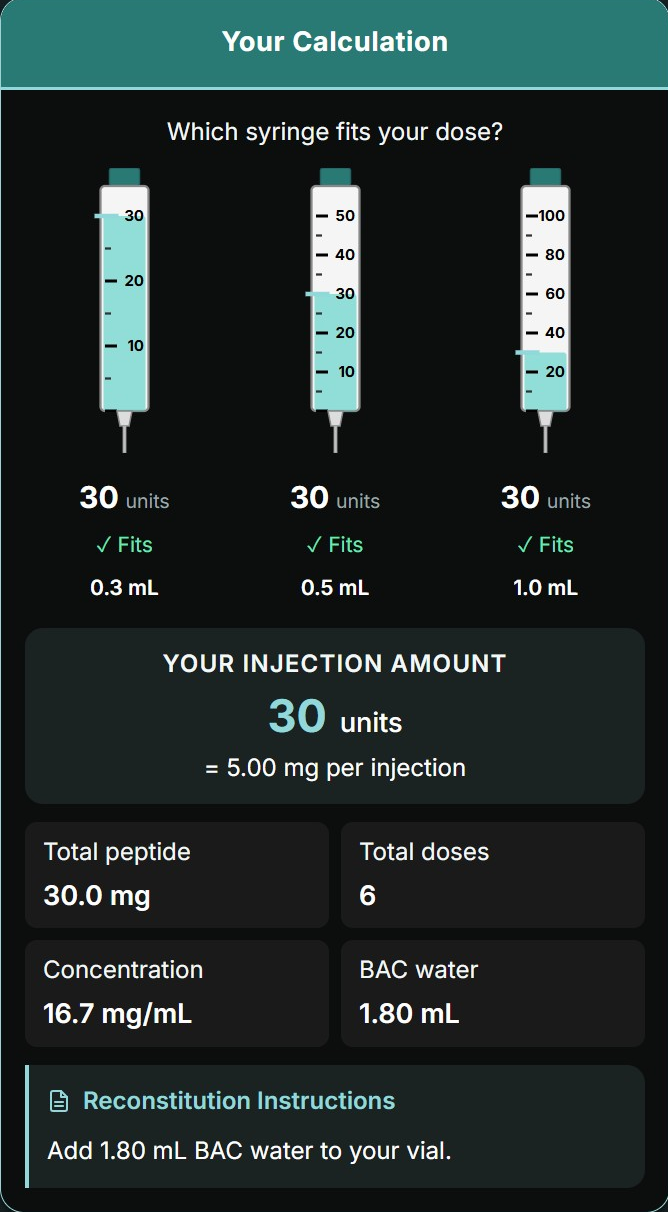
Skip the calculations. Just tell EasyDose what’s in your vial and what dose you need, and it figures out the best injection volume and exactly how much BAC water to add. Clear instructions, no guesswork—ready to dose in seconds.
PepTrac Custom Concentration Peptide Calculator
Already know your preferred injection size? This tool lets you lock in your desired volume—whether that’s 25 units, 50 units, or any amount you’re comfortable measuring—then calculates exactly how much BAC water to add so each injection delivers your target dose. Ideal for users who want full control over their injection routine.
PepTrac Fill to Capacity Peptide Calculator
Planning to fill a pen cartridge completely or combine several vials? Fill-to-Capacity starts with a full 3 mL water fill and calculates your injection size based on the resulting concentration. Great for longer-lasting preparations.
PepTrac Step Up Peptide Calculator
Starting low and ramping up? This calculator is built for titration protocols. Enter your starting dose and target dose, and Step Up finds the optimal reconstitution volume that keeps both ends of your range within practical injection limits—then shows exactly how much to inject at each level. Ideal for protocols that ease into a full dose over time.
PepTrac Intranasal Peptide Calculator
Mixing for nasal spray? This calculator is built for intranasal protocols. Enter your peptide amount and target dose, and Intranasal Mode calculates the right saline volume for your sprayer—based on how many sprays you want per dose.
Reconstitution Basics
How much BAC water do I add to my peptide?
It all depends on what’s in your vial and what dose you plan to take. The peptide amount (mg) sets the starting point, and your target dosage determines how much BAC water will give you an easy, repeatable injection volume. PepTrac calculators gather this info and calculate the exact dilution so you get it right the first time.
How do I convert mg to mL for peptides?
You can’t convert mg to mL until after the peptide is mixed. The mg value tells you how much peptide is in the vial, and the mL value comes from the amount of BAC water you add during reconstitution. Once you choose how much water to add, the concentration (mg per mL) becomes clear, and from there you can calculate your injection volume.
PepTrac’s calculators make this simple by asking two quick questions — how much peptide is in your vial and what dose you want to take. From that, we tell you exactly how much BAC water to add, the resulting concentration, and the correct injection volume for your target dose.
What ratio of BAC water to peptide should I use?
There’s no single BAC-water-to-peptide ratio that works for everyone. The ideal dilution depends on how many milligrams are in your vial, your preferred injection volume, the capacity of your insulin syringe, and whether you’re using an injection pen. Some users choose a more diluted reconstitution to reduce injection discomfort, while others prefer a stronger concentration for smaller volume shots.
PepTrac’s peptide calculators help you determine the best BAC water ratio by taking your vial amount, dose target, and equipment into account. You’ll get a customized reconstitution recommendation, the exact amount of BAC water to add, and the final concentration in mg/mL.